
How to Reduce Snowflake Costs: A Practical Guide
Snowflake’s consumption-based pricing model offers flexibility, but without proper governance, costs can escalate quickly. After optimizing Snowflake environments for dozens of clients, we’ve identified the strategies that consistently deliver the biggest savings.
Understanding Your Snowflake Bill
Before optimizing, you need to understand where your credits are going. Snowflake costs break down into three categories:
- Compute: Virtual warehouse usage (typically 60-80% of your bill)
- Storage: Data stored in tables, stages, and Time Travel
- Cloud Services: Metadata operations, query compilation, access control
Most optimization effort should focus on compute, where the biggest savings live.
1. Right-Size Your Warehouses
The most common mistake we see is running oversized warehouses. A warehouse that’s one size too large doubles your cost for that workload.
What to do:
- Audit warehouse utilization using
WAREHOUSE_METERING_HISTORY - Look for warehouses consistently using less than 50% of available resources
- Test smaller sizes — Snowflake makes it easy to resize without downtime
- Use multi-cluster warehouses for concurrent workloads instead of oversizing
A practical sizing approach: Run your production workload (or equivalent) at each warehouse size, starting small. Measure execution time and cost at each tier. Stop scaling up when you stop seeing linear improvements — that’s your sweet spot.
2. Configure Auto-Suspend and Auto-Resume
Idle warehouses burn credits. Set auto-suspend to the minimum practical value.
Recommended settings:
- Ad-hoc/BI warehouses: 1 minute auto-suspend
- ETL warehouses: 1 minute (or immediate for batch jobs)
- Loading warehouses: 0 (suspend immediately after load completes)
Avoid the default 10-minute auto-suspend — it wastes credits on idle time.
Auto-resume is equally important — warehouses should start automatically when queries arrive, eliminating the need for manual intervention.
3. Optimize Your Queries
Inefficient queries waste compute. Focus on the highest-impact improvements:
- Avoid SELECT *: Only query the columns you need. Snowflake’s columnar storage benefits enormously from column pruning.
- Use clustering keys on large tables queried with predictable filters
- Leverage result caching: Repeated identical queries are free when results are cached
- Minimize data scanning with proper partition pruning and micro-partition alignment
4. Separate Workloads by Warehouse
Don’t run everything on one warehouse. Separate workloads to right-size each:
- Loading warehouse: Small, auto-suspends immediately
- Transformation warehouse: Medium, scaled for dbt/ELT jobs
- BI warehouse: Medium with multi-cluster for concurrent users
- Ad-hoc warehouse: Small with generous timeouts
5. Use Zero-Copy Clones, Not CTAS Backups
One of the most expensive anti-patterns we see: using CREATE TABLE AS SELECT (CTAS) to create backup copies of tables before ETL runs. This wastes both compute and storage.
Instead, use zero-copy clones:
CREATE TABLE my_table_backup CLONE my_table;creates an instant, zero-cost snapshot- Clones share the underlying micro-partitions — no data is duplicated
- Perfect for point-in-time recovery if an ETL job goes wrong
- We’ve seen customers running CTAS on multi-billion row tables before every ETL run — switching to clones eliminated thousands of dollars in monthly waste
6. Govern Credit Usage with Resource Monitors
Set up resource monitors to prevent runaway costs:
- Create monitors per warehouse and per account — granular monitoring catches issues faster than account-level-only alerts
- Set warning thresholds at 75% and 90% of budget
- Suspend warehouses at 100% to prevent overages
- Review and adjust monthly
7. Optimize Storage Costs
Storage is cheaper than compute, but can still surprise you:
- Fail-safe is always 7 days and is NOT adjustable — this is a common misconception. The only way to avoid Fail-safe storage costs is to use transient tables.
- Use transient tables for intermediate processing — staging tables, ETL intermediates, and any table where the data can be recreated from source
- Make schemas transient if your tool doesn’t support creating transient tables directly — all tables created in a transient schema inherit the transient property
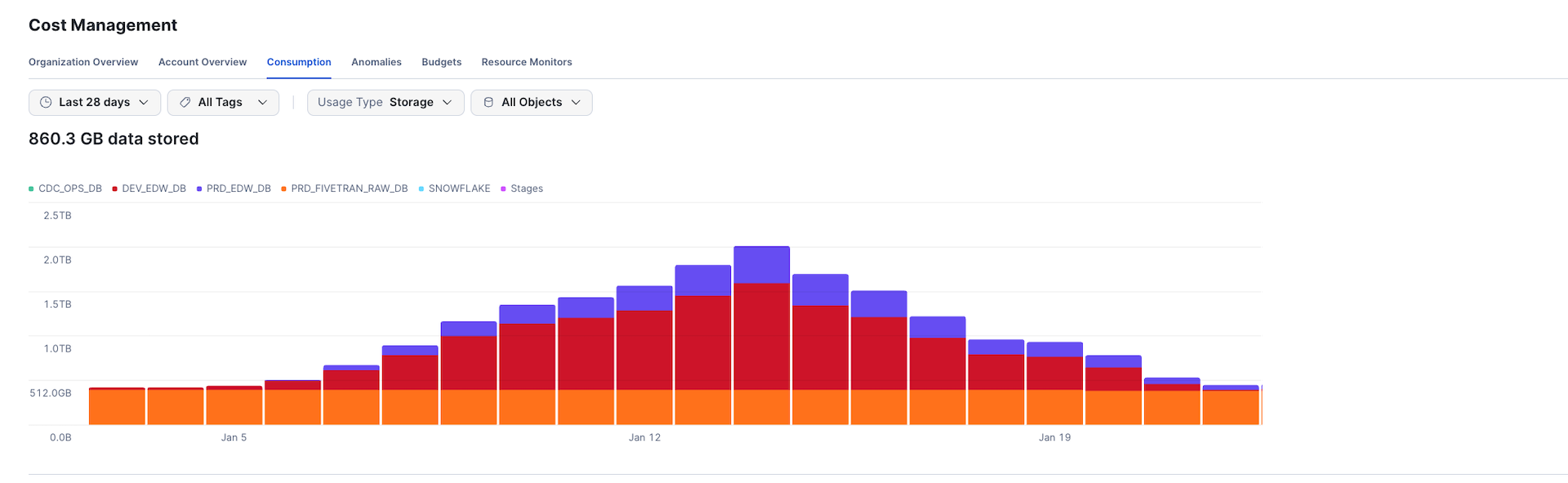
- Watch out for Dynamic Tables doing full refreshes — if a Dynamic Table isn’t transient, every full refresh generates new micro-partitions that accumulate 7 days of Fail-safe storage. On large tables, this can create enormous hidden storage costs. The chart below shows a real client environment where storage spiked from 512GB to over 2TB in just one week due to this issue:
- Reduce Time Travel retention to 1 day for non-critical and staging tables
- Drop unused tables and temporary objects regularly
What We’ve Seen in Practice
Across our 20+ Snowflake client engagements, these strategies consistently deliver 30-70% cost reductions as part of data warehouse modernization projects. The biggest wins usually come from warehouse right-sizing and auto-suspend configuration — changes that take hours to implement but save thousands per month.
Need Help Optimizing Your Snowflake Costs?
Whether you’re optimizing an existing deployment or planning a cloud migration, we offer Snowflake cost optimization assessments that identify specific savings opportunities in your environment. Schedule a free consultation to discuss your Snowflake spending.